
Simplified P&L · Power BI template
Present your month-end close to your leadership team
- Connect your accounting software in minutes
- A report you can use right away
- Save 2 months of development
Built on real client projects, with a deployment guide, an anonymized dataset, email support, and advanced visualization techniques you can reuse in your own reports. If you want a hand, book a session with me.
€109excl. VAT
Taxes calculated at checkout
- Deployment kit included
- Support within 48 business hours
- Consulting available
Connect your accounting software in minutes
Start from the trial balance in your accounting software. The deployment guide shows you how to map your accounts to the report's lines. The report fills in, then updates every month with your new numbers.
 QuickBooks
 Xero
Xero- NetSuite
- Sage Intacct
- Dynamics 365
- Excel
In three steps
Test it
Open the report with the anonymized dataset: everything already works.
Connect your data
Export your trial balance every month and group its accounts into the 18 lines of the delivered Excel file. Then point Power BI Desktop to that file, with the guide at hand.
Check and publish
Compare revenue with your accounting and run the guide's three consistency checks, then publish the report for your leadership team.
We list the big names, but the report connects to any data source. Not sure about yours? Email me a sample of your export at emilien@datapilot.fr, and I'll get back to you within 48 business hours.
A report you can use right away
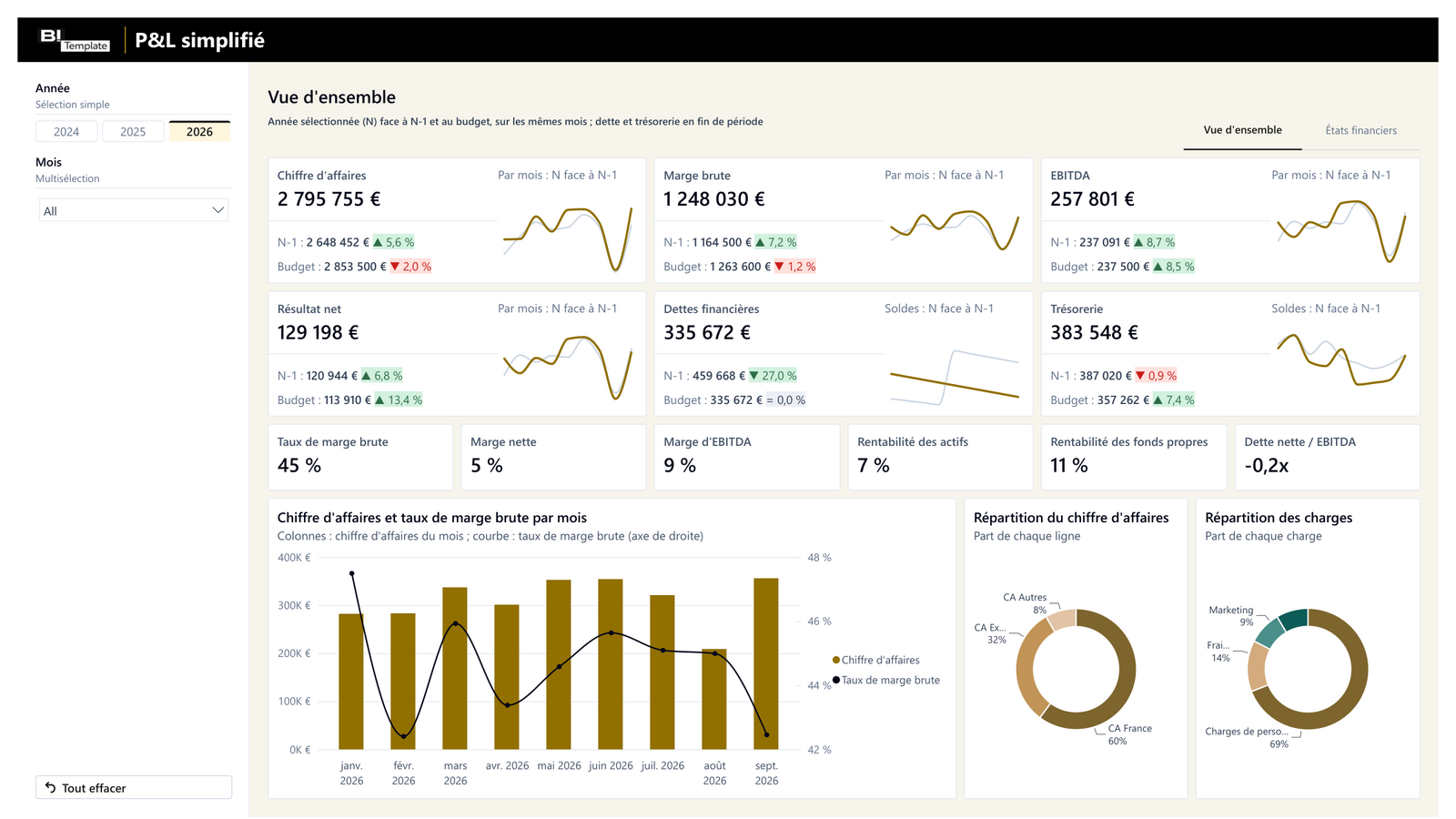
Track your six key figures vs. last year and budget, with variances and ratios already calculated. Read your income statement, balance sheet, and cash flow line by line, for the month or year to date. Clear numbers, ready to present to your leadership team.
| Actual | PY | vs PY | |
|---|---|---|---|
| Revenue | $355,899 | $315,782 | +13% |
| Gross profit | $151,101 | $144,692 | +4% |
| Net income | $19,207 | $21,809 | -12% |
Report extract, anonymized data
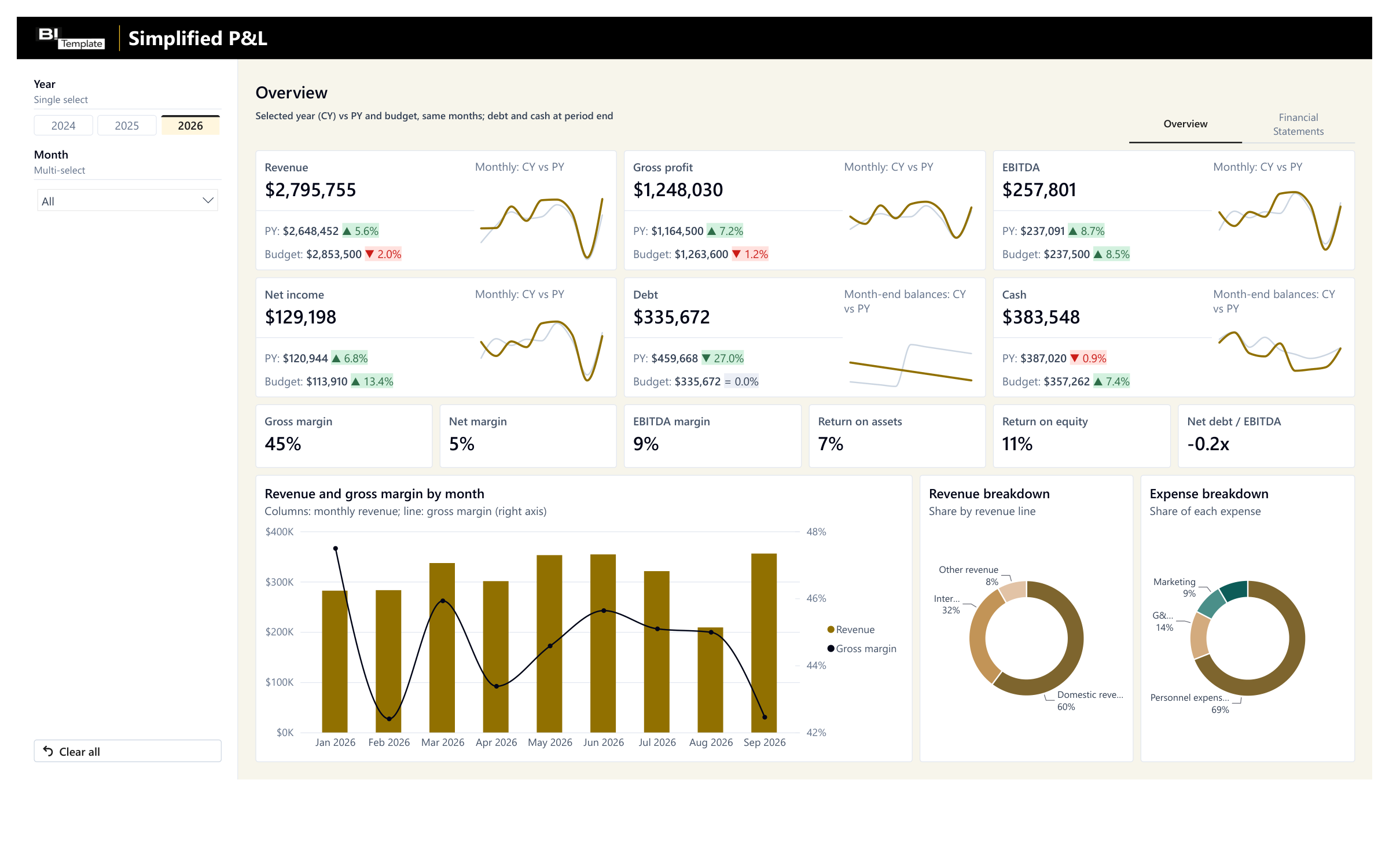
Where your year stands, vs. last year and budget 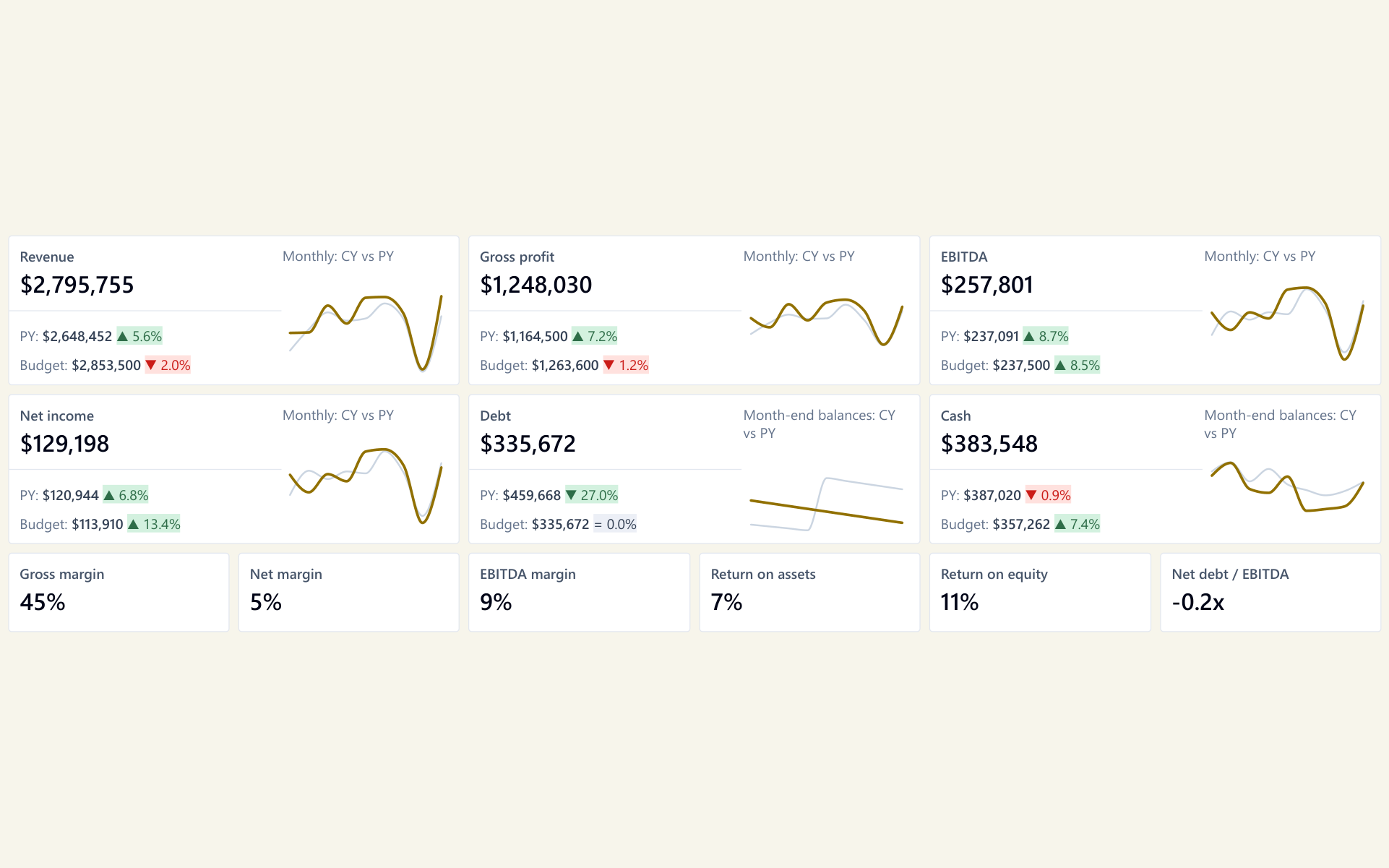
An unfavorable variance shows in red, vs. last year and budget alike 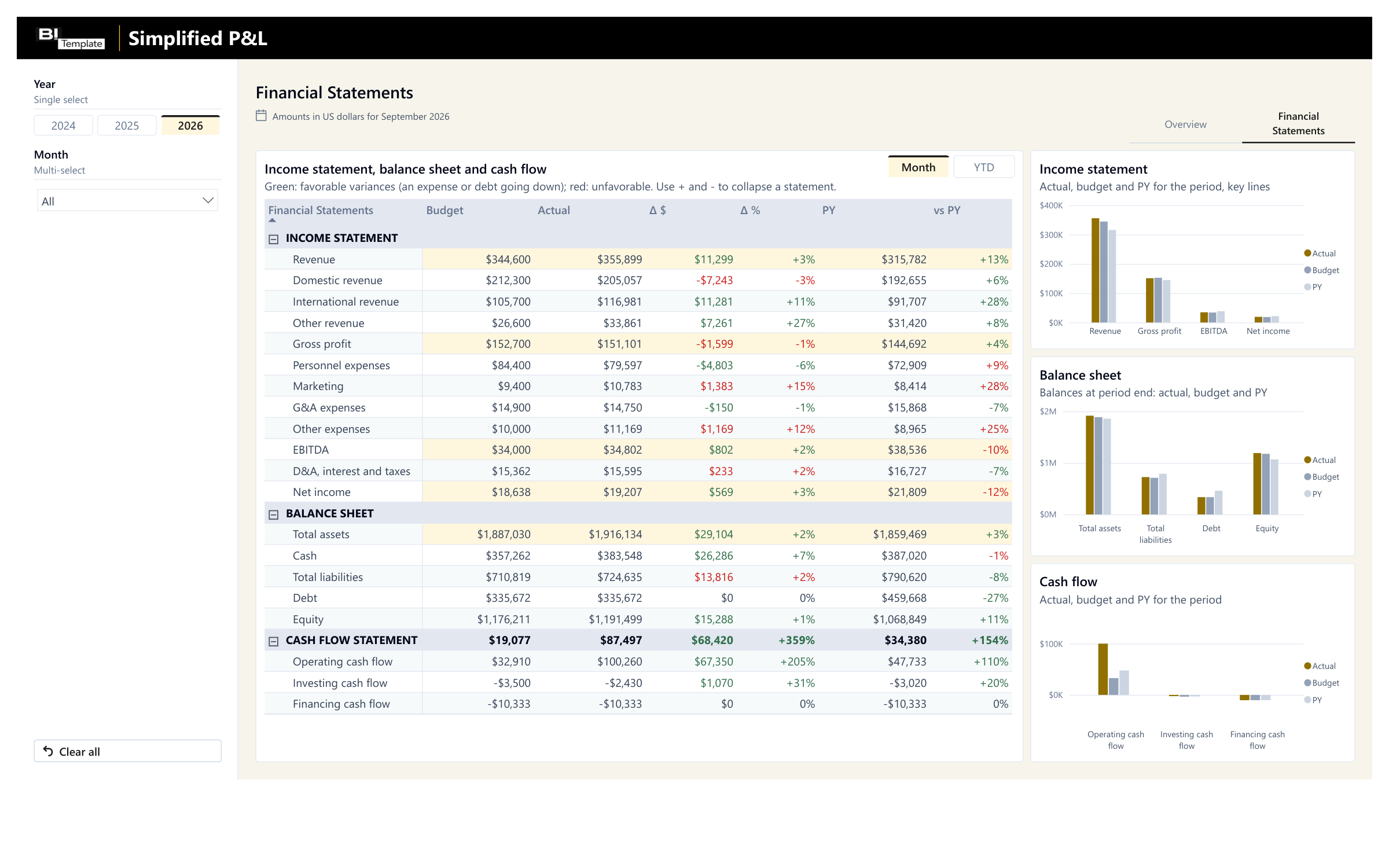
Your month-end close line by line, vs. budget and last year
Anonymized data. Your own numbers take its place as soon as you connect your export.
Filter, hover, explore: this is the report you get, loaded with the anonymized dataset.
Save 2 months of development
Our experts have built a P&L dozens of times on client projects. Start from this standard instead of from scratch.
With an agency
A project built from scratch
- Timeline
With an agency : 2 months of development- Price
With an agency : From €3,000 excl. VAT
With a template
A standard proven on client projects
- Timeline
- Ready to use today
- Price
- €109 excl. VAT
Timeline and price observed at other agencies for a simple report, custom-built.
Need something specific to your business? At Datapilot, our experts start from this report to build yours. Talk to Datapilot
What you get
The Power BI report
The Power BI Desktop file. It's yours: change it however you like.
The deployment guide
A step-by-step PDF, from opening the report to publishing it.
The anonymized dataset
An Excel file to test everything before you connect your own numbers.
By email, right after payment: one download link to a .zip file with all 3 files.
Consulting services
Would you like one-on-one help while you set up your template?
I'll help you get started with your template and set it up. I have 10 years of experience in reporting, and I can help you figure out how to export your data, deploy the report, or adapt it to your business.

Emilien GrangerFounder and CTO of Datapilot
One hour for €200 excl. VAT, or a half day for €500 excl. VAT, with the report or later.
Taxes calculated at checkout
FAQ

Yes. The simplest way is to start from your trial balance every month, whatever your software; the deployment guide explains how to bring it into the delivered Excel file. We list the big names, but the report connects to any data source.
No. You map each of your accounts to a line of the report, and you can add a line to the financial statements detail, such as subcontracting. The deployment guide gives a standard account mapping to adapt to yours, and three consistency checks to make sure no account is missing or counted twice. I can help you connect your tools and answer your questions.
No.
Yes. Add the same months from the previous year to the Excel file, and the report does the comparison on its own.
Licenses, delivery, support, and payment are covered in the FAQ. See all questions
Technical details
Every report ships connected to an Excel file, the simplest setup when you don't have a data infrastructure. You can swap that file for your own Excel files, and, more importantly, connect the report directly to your sources.
Possible sources
QuickBooks
- By export
- Your trial balance, every month.
- Direct connection
- The QuickBooks API.
Xero
- By export
- Your trial balance, every month.
- Direct connection
- The Xero API.
NetSuite
- By export
- Your trial balance, every month.
- Direct connection
- NetSuite, through its API or its database, depending on your setup.
Sage Intacct
- By export
- Your trial balance, every month.
- Direct connection
- The Sage Intacct API.
Dynamics 365 Business Central
- By export
- Your trial balance, every month.
- Direct connection
- The Business Central API.
An Excel file kept by you or your accountant
- By export
- Your numbers for each month, in the format of the delivered file.
- Direct connection
- The report connects to your own Excel file instead.
A direct connection takes some setup on your side, and the closer you get to the source, the more technical it gets. I can help you connect through consulting services, so everything goes as smoothly as possible.
How the report is built today
The tables of the delivered Excel file, as the report reads them today. It stays flexible: your data doesn't need to have this exact shape.
"Data" sheet (actual and budget)
Scenario (Actuals or Budget), Amount (in whole dollars), Line item (financial statement line), Month & Year (month), Statement (financial statement)
Calendar
built into the report
- Power BI Desktop file (.pbix), ready to publish to the Power BI service.
- Two pages: Overview (six KPIs vs. prior year and budget, six ratios, three charts) and Financial Statements (income statement, balance sheet, and cash flow, with budget, actual, variances, prior year, and change, for the month or year to date); Year and Month filters.
- Data loaded by Power Query from the "Data" sheet of an Excel workbook, the anonymized dataset, which you replace with your numbers; a single query points to the file to read.
- 18 expected lines: Domestic revenue, International revenue, Other revenue, Gross profit, Personnel expenses, Marketing, G&A expenses, Other expenses, EBITDA, and Net income; Total assets, Cash, Total liabilities, Debt, and Equity; Operating cash flow, Investing cash flow, and Financing cash flow. An added line shows up in the financial statements matrix.
- Revenue calculated by Power Query (Domestic + International + Other revenue), as is a D&A, interest and taxes line (EBITDA minus net income), so the income statement reads down to net income; gross profit, EBITDA, and net income taken from your accounting, not recalculated.
- Star schema: one fact table (amounts by scenario, month, statement, and line) linked to the actual or budget scenario, the statement lines, the three statements, and a calendar rebuilt at every refresh.
- DAX measures: actual, prior year over the same months, budget and variances, six non-annualized ratios, financial statements matrix.
- Variances and changes in % are relative to the absolute value of the reference, to keep the right sign when the budget or prior year is negative; colors follow each line's favorable direction: an expense under budget shows in green.
Your report is ready. All it needs is your numbers.
One payment, no subscription. You get the report, its deployment guide, and an anonymized dataset already loaded. Connect your source, and your report is ready to use.
€109excl. VAT
Taxes calculated at checkout
More templates for Finance & Accounting
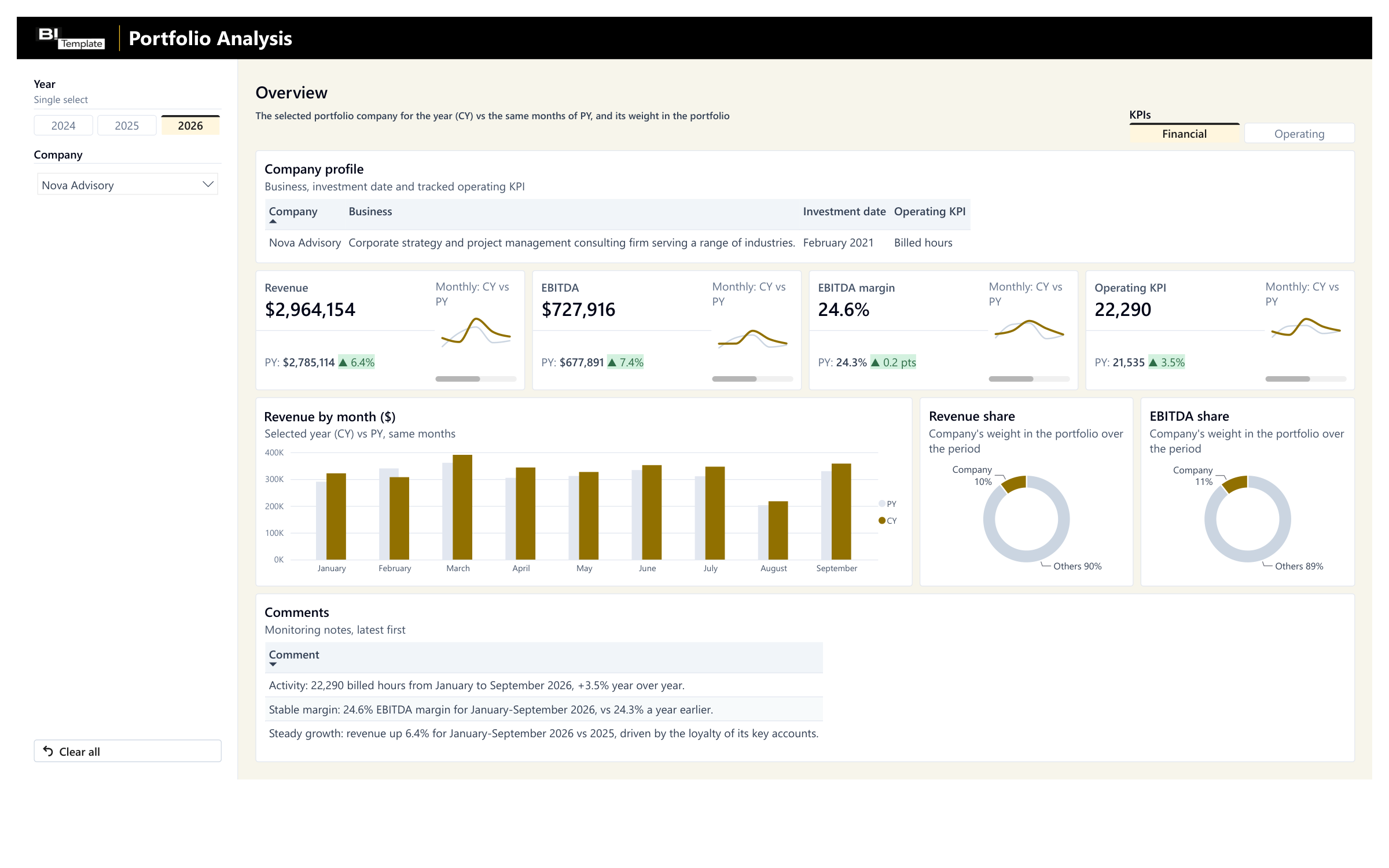
Portfolio Monitoring
Your portfolio companies' monthly reporting vs. last year, with their weight in your portfolio.
€89 excl. VAT
Read more on the blog
Visuels Power BI : 10 erreurs de débutants à corriger
10 erreurs que nous retrouvons souvent dans les rapports Power BI de débutants, et comment les corriger en quelques clics.
25 avril 2026 · 8 min de lecture
Construire votre premier rapport financier avec Power BI
Utilisateurs, données, modèle, pages : les bases d'un rapport financier Power BI que votre direction lit vraiment, et les 3 erreurs à éviter.
6 avril 2026 · 9 min de lecture