
Digital Marketing Analysis · Power BI template
Track audience and leads from Facebook, LinkedIn, your newsletters, and your websites
Built on real client projects, with a deployment guide, an anonymized dataset, email support, and advanced visualization techniques you can reuse in your own reports. If you want a hand, book a session with me.
€129excl. VAT
Taxes calculated at checkout
- Deployment kit included
- Support within 48 business hours
- Consulting available
Connect your marketing tools in minutes
Start from your marketing tools' exports, in Excel or CSV. The deployment guide tells you what to export from each one. The report fills in, then updates every month with your new numbers.
- Google Ads
- Google Analytics
- Google Search Console
- Constant Contact
- Mailchimp
- Excel
In three steps
Test it
Open the report with the anonymized dataset: everything already works.
Connect your data
Export each tool's numbers month by month and bring them into the delivered Excel file, under its headers. Then point Power BI Desktop to that file, with the guide at hand.
Check and publish
Compare the report's Facebook spend with your Meta Ads Manager, then publish the report for your leadership team.
We list the big names, but the report connects to any data source. Not sure about yours? Email me a sample of your export at emilien@datapilot.fr, and I'll get back to you within 48 business hours.
A report you can use right away
Track your impressions, clicks, leads, and spend vs. last year, with each channel's cost per lead already calculated. Facebook, LinkedIn, your newsletters, your websites, and your Google search performance each get their own page, with your campaigns in detail. Clear numbers, ready to present to your leadership team.
| 2026 | PY | vs PY | |
|---|---|---|---|
| Impressions | 3,662,023 | 3,239,756 | +13.0% |
| Clicks | 93,200 | 80,426 | +15.9% |
| Leads | 769 | 735 | +4.6% |
Report extract, anonymized data
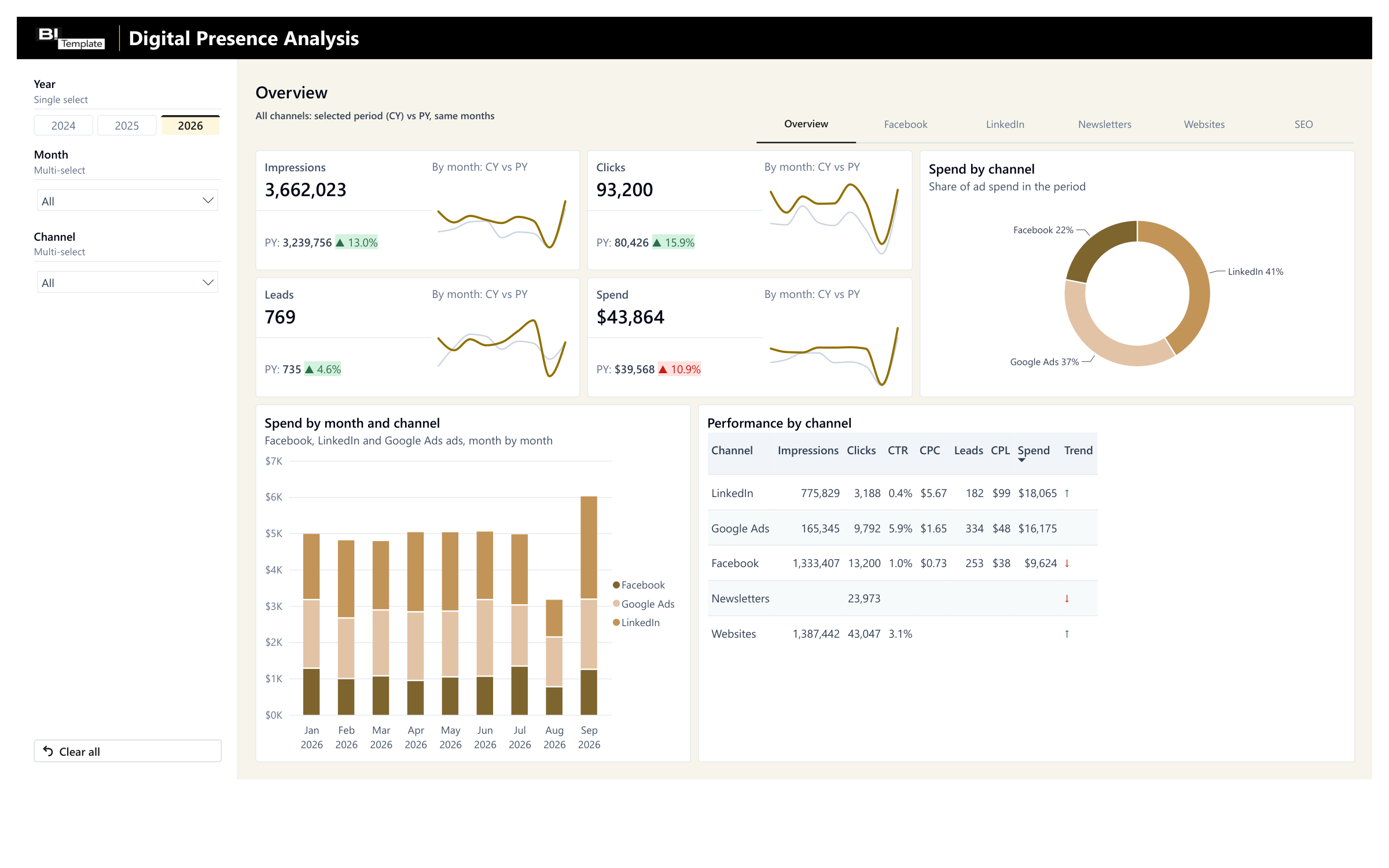
All your channels on one page, vs. last year 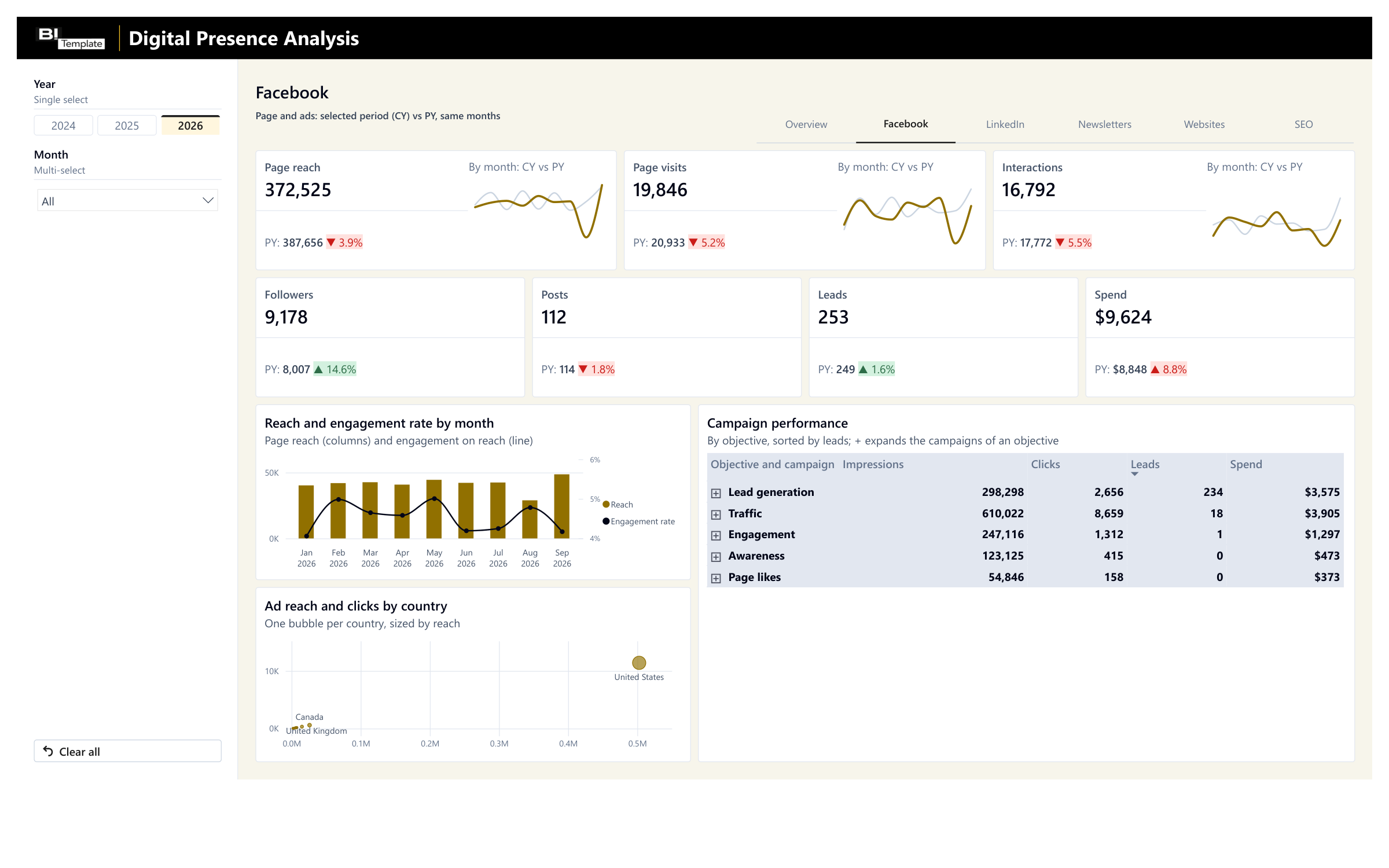
The Facebook campaigns that bring you leads 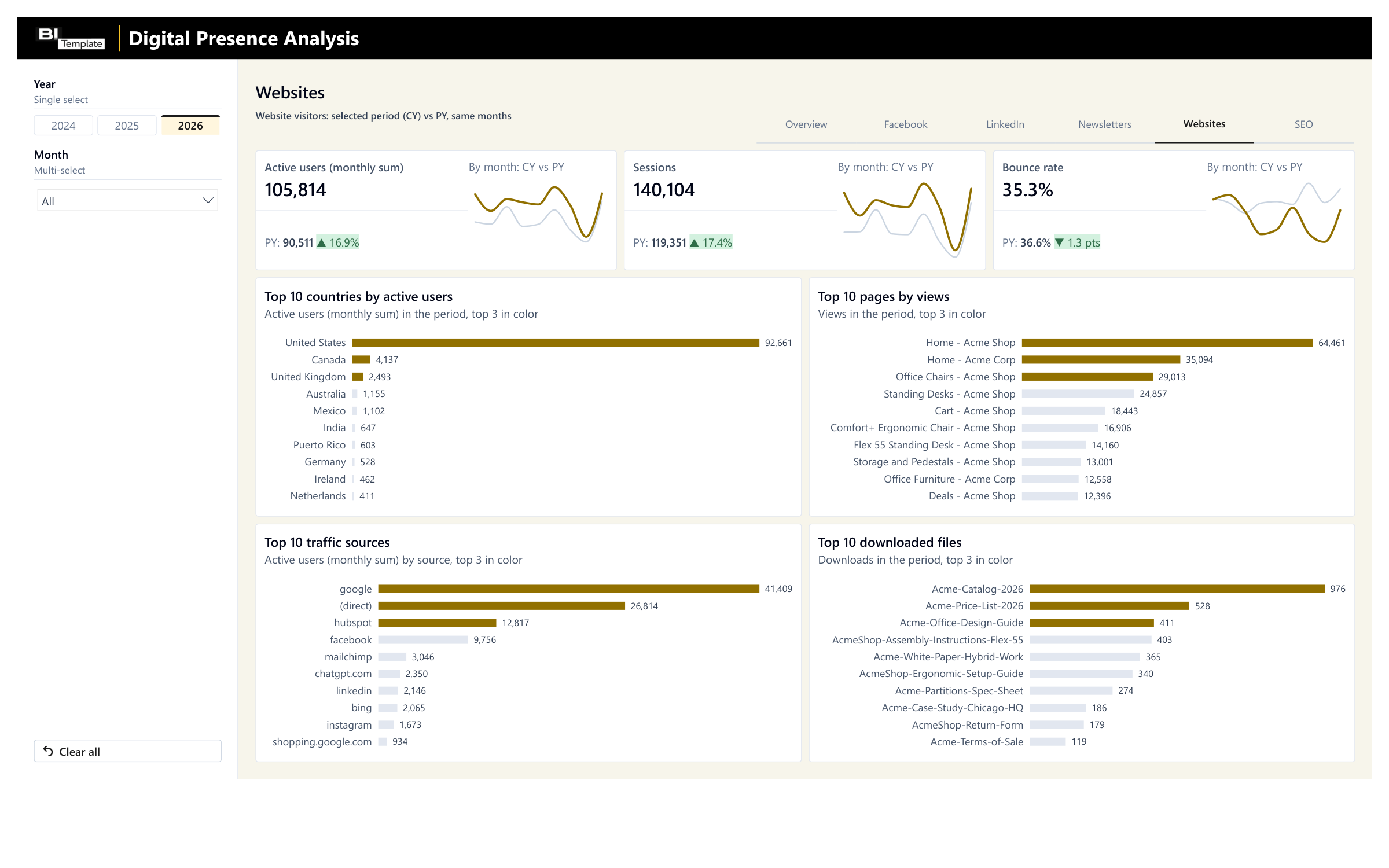
Where your visitors come from and the pages they view 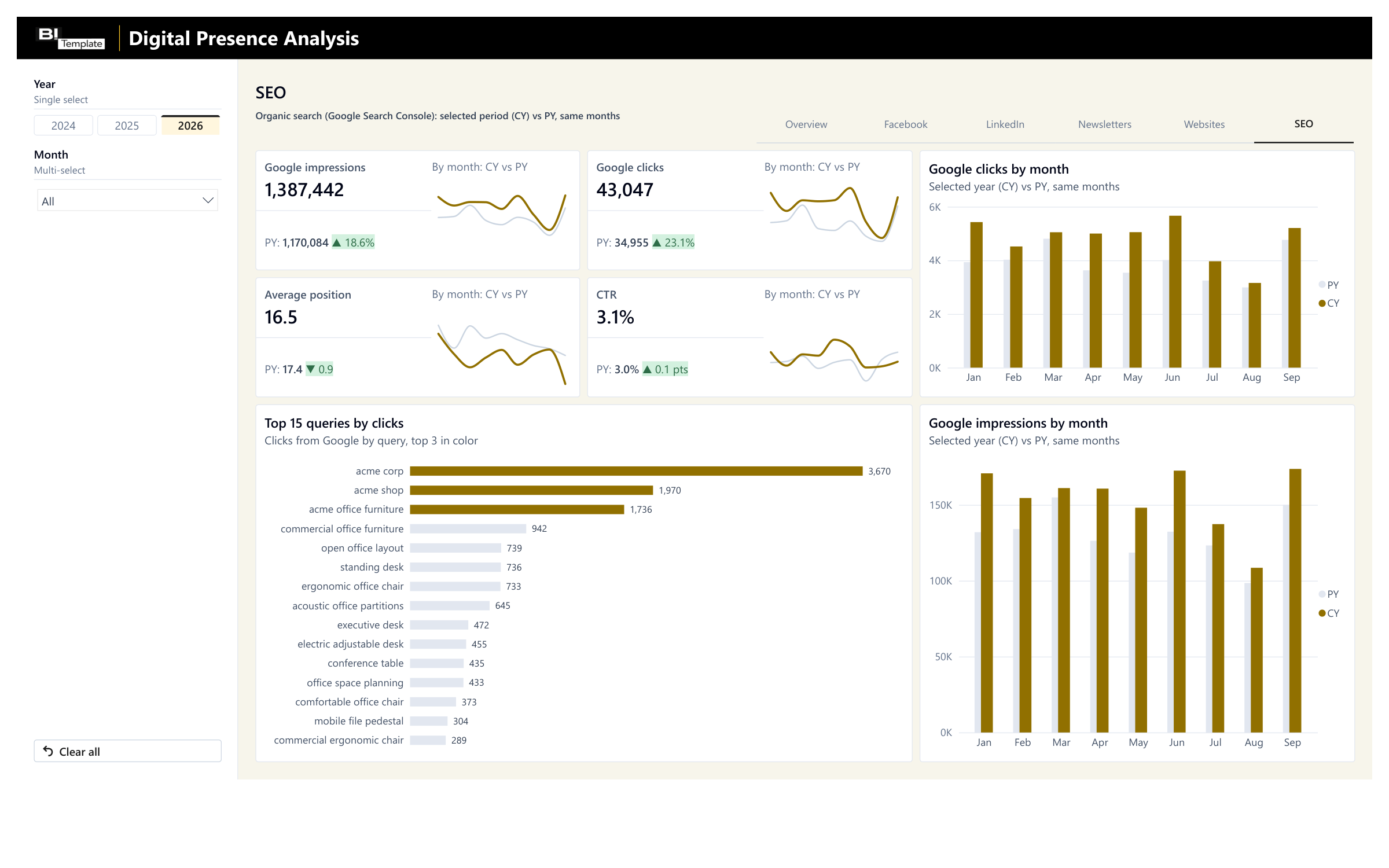
Your visibility in Google, vs. last year
Anonymized data. Your own numbers take its place as soon as you connect your export.
Filter, hover, explore: this is the report you get, loaded with the anonymized dataset.
Save 2 months of development
Our experts built this social media, newsletter, and website tracking on client projects. Start from this standard instead of from scratch.
With an agency
A project built from scratch
- Timeline
With an agency : 2 months of development- Price
With an agency : From €3,000 excl. VAT
With a template
A standard proven on client projects
- Timeline
- Ready to use today
- Price
- €129 excl. VAT
Timeline and price observed at other agencies for a simple report, custom-built.
Need something specific to your business? At Datapilot, our experts start from this report to build yours. Talk to Datapilot
What you get
The Power BI report
The Power BI Desktop file. It's yours: change it however you like.
The deployment guide
A step-by-step PDF, from opening the report to publishing it.
The anonymized dataset
An Excel file to test everything before you connect your own numbers.
By email, right after payment: one download link to a .zip file with all 3 files.
Consulting services
Would you like one-on-one help while you set up your template?
I'll help you get started with your template and set it up. I have 10 years of experience in reporting, and I can help you figure out how to export your data, deploy the report, or adapt it to your business.

Emilien GrangerFounder and CTO of Datapilot
One hour for €200 excl. VAT, or a half day for €500 excl. VAT, with the report or later.
Taxes calculated at checkout
FAQ

Yes. The simplest way is to start from your tools' exports, in Excel or CSV; the deployment guide says what to export from each one and how to bring it into the delivered Excel file. We list the big platforms, but the report connects to any data source. I can help you connect your tools and answer your questions.
No. Connect only the ones you use: the Overview adds up your channels.
Yes. The report adds up your websites, your ad accounts, and your email marketing tools.
Yes. Add the same months from the previous year to the Excel file, and the report does the comparison on its own.
Licenses, delivery, support, and payment are covered in the FAQ. See all questions
Technical details
Every report ships connected to an Excel file, the simplest setup when you don't have a data infrastructure. You can swap that file for your own Excel files, and, more importantly, connect the report directly to your sources.
Possible sources
Facebook
- By export
- Your page insights (Meta Business Suite) and campaign results (Meta Ads Manager), month by month.
- Direct connection
- The Meta API, for your page and your campaigns.
LinkedIn
- By export
- Your page analytics and campaign results (LinkedIn Campaign Manager), month by month.
- Direct connection
- The LinkedIn API, for your page and your campaigns.
Google Ads
- By export
- Impressions, clicks, cost, and leads for each month.
- Direct connection
- The Google Ads API.
Google Analytics
- By export
- Your sites' audience by month, country, and source, the views of each page, and your downloads.
- Direct connection
- The Google Analytics API.
Google Search Console
- By export
- The Performance report: clicks, impressions, and average position for each month, then clicks by query.
- Direct connection
- The Google Search Console API.
Constant Contact
- By export
- The stats of each campaign sent.
- Direct connection
- The Constant Contact API.
Mailchimp
- By export
- The stats of each campaign sent.
- Direct connection
- The Mailchimp API.
A marketing tracker kept in Excel
- By export
- Your numbers, in the format of the delivered file.
- Direct connection
- The report connects to your own Excel file instead.
A direct connection takes some setup on your side, and the closer you get to the source, the more technical it gets. I can help you connect through consulting services, so everything goes as smoothly as possible.
How the report is built today
The tables of the delivered Excel file, as the report reads them today. It stays flexible: your data doesn't need to have this exact shape.
"FACT_facebook_page" sheet (Facebook page, by month)
month, page_reach, page_visits, post_engagements, number_of_content, followers
"FACT_FacebookFollowers" sheet (Facebook page followers, by snapshot)
Date, Followers, Company Name
"FACT_facebook_ads" sheet (Facebook campaigns, by month)
campaign_name, objective, month, impressions, link_clicks, spend, conversions, leads
"FACT_facebook_ads_country" sheet (Facebook ads, by country and month)
month, country, reach, clicks
"FACT_facebook_ads_age_gender" sheet (Facebook ads, by age and gender; no visual shows it)
month, AgeGenderID, reach, clicks
"FACT_linkedInPage" sheet (LinkedIn page, by month)
month, total_impressions, post_engagement, post_count, followers_end_of_month
"FACT_LinkedInFollowers" sheet (LinkedIn page followers, by snapshot)
Date, Followers, Company Name
"FACT_linkedin_ads" sheet (LinkedIn campaigns, by month)
campaign_name, objective_type, month, impressions, clicks, conversions, engagements, reach, leads, video_views, cost_usd
"FACT_linkedIn_country" sheet (LinkedIn page views, by country)
country, total_page_views
"FACT_google_ads" sheet (Google Ads, by month)
month, total_impressions, total_clicks, total_spend_usd, total_conversions, total_leads
"FACT_Newsletter" sheet (one row per campaign sent)
campaign_name, sent_date, sends, unique_opens, unique_clicks, bounces, unsubscribes, complaints, Platform
"FACT_events" sheet (Google Analytics: audience by month, country, source, and site, plus downloads)
event_date, country, source, Cleaned_Source, Site, views, active_users, sessions, engaged_sessions, form_starts, file_downloads, downloaded_file_name
"FACT_PageEvents" sheet (Google Analytics: views by page and month)
event_month, page_title, views, active_users, Site
"FACT_google_search_console" sheet (Search Console, by site and month)
site, month, total_clicks, total_impressions, avg_position
"FACT_Queries_google_search" sheet (Search Console: queries, by site and month)
site, month, query, total_clicks, rank_clicks
"DIM_Site" sheet (your websites)
SiteID, URL, Name
"DIM_Channel" sheet (the five channels, fixed list)
Channel
built into the report"DIM_AgeGender" sheet (age groups and genders, fixed list)
Merged, AgeGenderID, age, gender
built into the reportCalendar
built into the report
- Power BI Desktop file (.pbix), ready to publish to the Power BI service.
- Six pages, 31 KPI cards: Overview (all channels together, spend by channel, and a Performance by channel table), Facebook, LinkedIn, Newsletters, Websites, and SEO; Year and Month filters on every page, plus Channel on the Overview.
- Data loaded by Power Query from the 18 sheets of an Excel workbook, the anonymized dataset, which you replace with your exports; a single query points to the file to read.
- Facebook and LinkedIn campaign objectives turned into readable labels by Power Query; an unknown objective code shows as is, with correct numbers.
- Model: one table per sheet; dated tables are linked to a calendar rebuilt at every refresh, Search Console tables to your list of sites, and Facebook ad countries to a country table.
- Each KPI is compared with the prior year over the same months, up to the last month with data: variance in % for a count, in points for a rate, in value for average position. Colors follow each KPI's favorable direction (rising spend or bounce rate shows in red).
- Overview totals: the sum of the channels, including leads and spend from Facebook, LinkedIn, and Google Ads. In the Performance by channel table, the trend arrow compares each channel's key metric with the prior year: Facebook page reach, LinkedIn interactions, newsletter open rate, website sessions.
- DAX measures organized in folders in the _Measures table: rates calculated on period totals, never as an average of rates (click-through rate, cost per click and per lead, engagement, open, click-to-open, and bounce rates); average position weighted by impressions; followers at the period's last snapshot; rankings (Top 5, 10, and 15) recalculated for the selected period.
Your report is ready. All it needs is your numbers.
One payment, no subscription. You get the report, its deployment guide, and an anonymized dataset already loaded. Connect your source, and your report is ready to use.
€129excl. VAT
Taxes calculated at checkout
More templates for Marketing
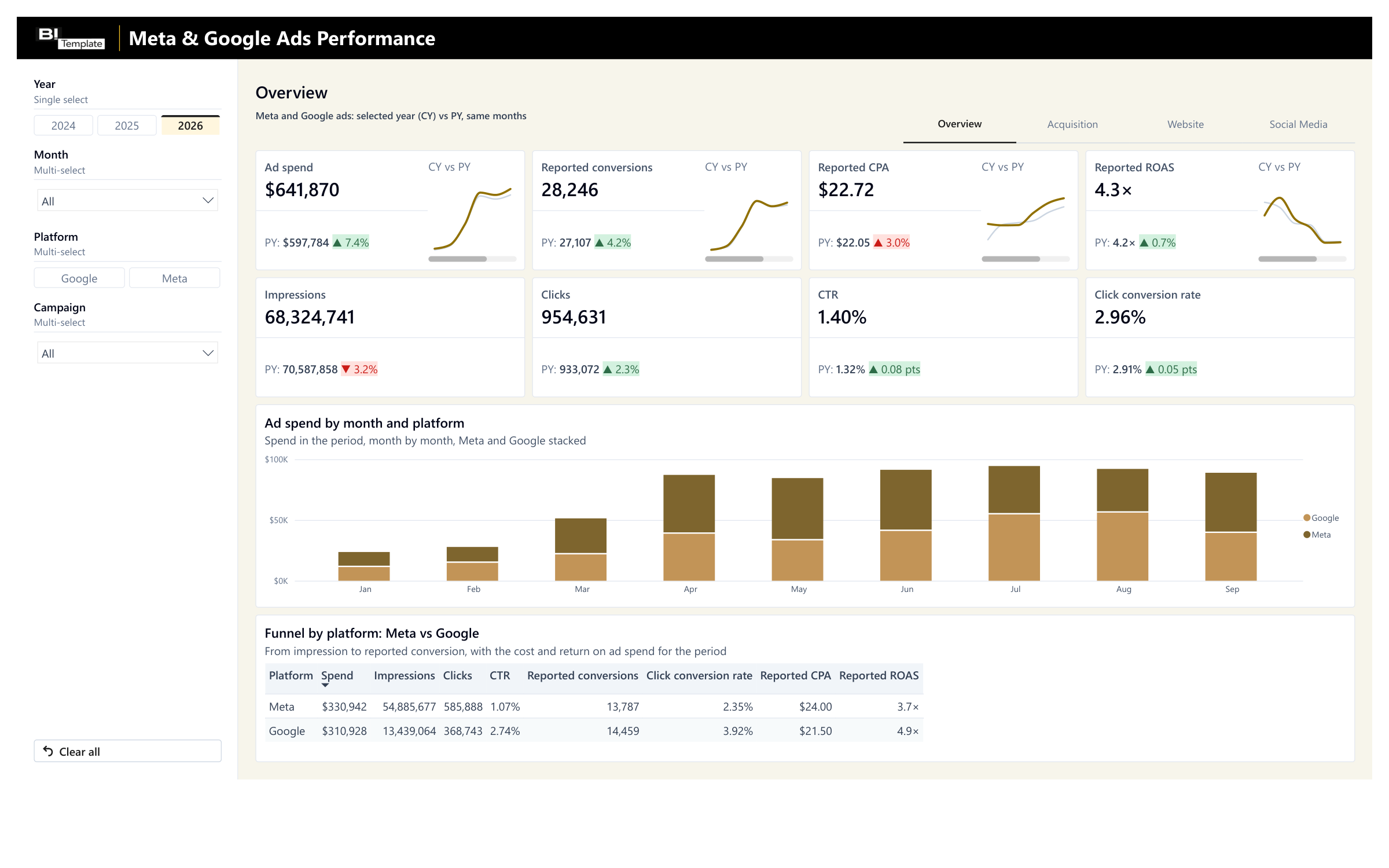
Meta & Google Ads Performance Report
Your Meta and Google spend and results, campaign by campaign.
€69 excl. VAT